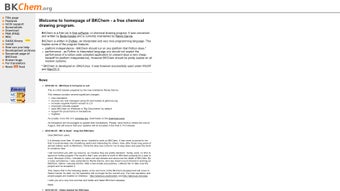

Télécharger BKChem – outil gratuit de dessin chimique pour Mac, Windows et Linux
Vue d'ensemble de BKChem
BKChem est une application graphique vectorielle légère et open‑source conçue spécifiquement pour les chimistes, les éducateurs et les étudiants qui ont besoin de créer des représentations schématiques précises de composés chimiques. Bien qu’elle ait été initialement conçue pour macOS, le moteur basé sur Python la rend entièrement compatible avec Windows et les distributions Linux, lui conférant une portée multiplateforme que de nombreux outils scientifiques de niche n’ont pas. La force principale de BKChem réside dans son flux de travail de dessin liaison‑par‑liaison, qui oblige chaque liaison à respecter des contraintes de longueur et d’angle prédéfinies, garantissant que les structures résultantes sont non seulement esthétiques mais aussi chimiquement exactes.
L’interface est intentionnellement minimaliste : une barre d’outils héberge les types de liaisons les plus fréquemment utilisés (simple, double, triple, aromatique) et un panneau latéral affiche les propriétés des atomes telles que la charge, la valence et le statut radicalaire. Les utilisateurs peuvent également passer en mode « formule linéaire », qui aligne automatiquement les atomes en ligne droite—utile pour dessiner les chaînes de polymères ou les réactions en chaîne. La bibliothèque intégrée de modèles par défaut comprend des cycles et des échafaudages populaires comme le benzène, la purine, le cyclopentadiène, le cyclopentane et le cycloheptane. Ces modèles servent de point de départ, permettant aux utilisateurs de se concentrer sur la personnalisation des substituants plutôt que de dessiner chaque atome à partir de zéro.
Les capacités d’exportation de BKChem sont particulièrement robustes pour un outil gratuit. Vous pouvez enregistrer vos dessins au format Scalable Vector Graphics (SVG) pour le web, Portable Document Format (PDF) pour la publication, PNG pour les images raster, ainsi qu’une foule de formats spécifiques à la chimie tels que CML, SMILES et Molfiles. Cette polyvalence fait de BKChem un pont idéal entre la recherche académique, les supports pédagogiques et les présentations professionnelles. De plus, le logiciel est publié sous licence GPL, garantissant aux utilisateurs des mises à jour de sécurité régulières et la liberté de modifier le code source s’ils le souhaitent.
Fonctionnalités clés de BKChem
- Bond‑by‑Bond Drawing Engine – Enforces exact bond lengths (1.5 Å by default) and standard angles (120°, 180°, 90°) to keep structures chemically valid.
- Pre‑loaded Molecular Templates – Instantly insert benzene, purine, cyclopentadiene, cyclopentane, cycloheptane, and more.
- Linear Formula Mode – Quickly generate chain structures with automatic alignment.
- Charge & Radical Support – Add formal charges, radicals, and isotopic labels directly from the toolbar.
- Multi‑Format Export – Save as SVG, PDF, PNG, OpenOffice Draw, ODF, CML, CML2, Molfiles, SMILES, and Encapsulated PostScript.
- Cross‑Platform Compatibility – Runs on macOS, Windows 7/10/11, and major Linux distributions (Ubuntu, Fedora, Debian).
- Open‑Source & Free – GPL‑licensed, with a vibrant community contributing plugins and bug fixes.
- Customizable Keyboard Shortcuts – Tailor the workflow to your personal preferences for faster drawing.
- Undo/Redo Stack – Unlimited steps back, ensuring experimental sketches can be safely explored.
Pourquoi ces fonctionnalités sont importantes pour les chimistes
Lorsque vous esquissez un mécanisme de réaction ou préparez une figure pour un manuscrit, précision et rapidité sont non négociables. Le moteur liaison‑par‑liaison de BKChem élimine les approximations qui peuvent conduire à des angles mal dessinés, tandis que la bibliothèque de modèles par défaut réduit le travail répétitif. Exporter directement vers SMILES ou CML vous permet d’importer la structure dans des paquets de chimie computationnelle sans transcription manuelle, réduisant ainsi les erreurs de saisie de données. La nature multiplateforme assure qu’un groupe de recherche réparti sur différents systèmes d’exploitation puisse collaborer sans heurts, en partageant des fichiers BKChem (.bkc) qui conservent tous les styles et détails d’annotation.
De plus, parce que BKChem est open source, les institutions peuvent auditer le code pour la conformité sécuritaire—une considération cruciale pour les laboratoires manipulant des composés propriétaires. La possibilité d’étendre le logiciel via des scripts Python signifie que les utilisateurs avancés peuvent automatiser des tâches répétitives, comme la génération par lot d’une série de dérivés benzéniques substitués pour une étude SAR.
Installation, utilisation & compatibilité
Guide d’installation étape par étape
Le téléchargement et l’installation de BKChem sont simples, quel que soit votre système d’exploitation :
- Visit the Official Website – Navigate to bkchem.org and click the “Download” button for your platform.
- Mac Users – Download the .dmg file, open it, and drag the BKChem icon into your Applications folder. macOS may prompt you to allow apps from unidentified developers; simply go to System Preferences → Security & Privacy and approve the app.
- Windows Users – Download the .exe installer. Run it with administrator rights, follow the wizard, and accept the default installation path (C:\Program Files\BKChem). Windows Defender may flag the installer; you can safely bypass this by selecting “More info” → “Run anyway”.
- Linux Users – Most distributions include BKChem in their repositories. For Ubuntu/Debian, open a terminal and type:
sudo apt-get update && sudo apt-get install bkchem. For Fedora, usesudo dnf install bkchem. If you prefer the latest version, download the source tarball, extract it, and runpython setup.py installafter installing the required dependencies (PyQt, OpenBabel). - First Launch – After installation, open BKChem. The welcome screen offers a quick tutorial that walks you through creating a simple molecule, adjusting bond angles, and exporting your first file.
Exigences système & prise en charge des systèmes d’exploitation
BKChem runs on modern versions of macOS (10.13 High Sierra and later), Windows 7/8/10/11 (64‑bit), and Linux kernels 3.10+. Minimum hardware requirements include a 1 GHz processor, 512 MB RAM, and at least 100 MB of free disk space for the application and temporary files. Because BKChem uses the Qt framework for its GUI, hardware acceleration is optional; it works well on laptops, desktops, and even older netbooks.
When working with large structures (e.g., polymers with >200 atoms), it’s advisable to allocate more RAM (1–2 GB) to avoid slowdown during rendering and export. BKChem also supports high‑resolution displays, scaling UI elements automatically on Retina or 4K screens.
Regular updates are released on the project’s GitHub page. Users can enable automatic update checks from the “Preferences” menu, ensuring they always have the latest bug fixes and security patches without manually downloading new installers.
Avantages, inconvénients & FAQ
Avantages
- Completely free and open‑source – no hidden fees.
- Accurate bond length and angle enforcement for chemically correct drawings.
- Extensive export options covering both graphic and chemical data formats.
- Cross‑platform support simplifies collaboration across macOS, Windows, and Linux.
- Built‑in library of common molecular templates accelerates workflow.
- Active community provides plugins, scripts, and timely updates.
Inconvénients
- Interface may feel dated compared to commercial alternatives like ChemDraw.
- No built‑in 3D visualization; requires external tools for stereochemistry.
- Learning curve for the bond‑by‑bond system can be steep for absolute beginners.
- Limited built‑in support for advanced reaction mechanisms (arrows, reagents).
FAQ – Réponses pour les nouveaux et les utilisateurs expérimentés
Is BKChem really free for commercial use?
Yes. BKChem is released under the GNU GPL license, which permits free use, modification, and distribution, even in commercial environments, as long as any derivative work also remains open‑source.Can I import existing chemical files (e.g., .mol, .sdf) into BKChem?
Yes. BKChem can open Molfile, SDF, and CML files via the “File → Import” menu. The program translates the 2‑D coordinates into its own editable format, allowing you to refine the structure further.How does BKChem handle stereochemistry?
Stereochemistry is represented using wedge and dash bonds. While BKChem does not generate 3‑D models, you can annotate chiral centers with appropriate wedge/dash symbols, and export to SMILES or CML, which retain the stereochemical information.Is there a way to batch‑export multiple structures?
Yes. Advanced users can write a Python script that uses BKChem’s API to open a folder of .bkc files and export each to SVG or PDF automatically. Sample scripts are available on the GitHub repository.What level of technical support does BKChem provide?
Support is community‑driven through the project’s mailing list, GitHub Issues page, and a dedicated forum. Because the code is open, you can also troubleshoot problems yourself or request enhancements directly from developers.BKChem delivers a solid, free alternative for 2‑D chemical drawing. Its precise bond engine and extensive export formats make it valuable for academia and industry alike. While the UI feels a bit dated and lacks built‑in 3‑D capabilities, the open‑source nature and cross‑platform reach outweigh these shortcomings. Overall, it earns a strong four‑star rating for reliability and flexibility.
Conclusion & Call to Action
In the crowded landscape of chemical drawing software, BKChem stands out by offering a no‑cost, open‑source solution that does not compromise on scientific accuracy. Its bond‑by‑bond methodology, combined with a library of ready‑made templates and an impressive suite of export options, equips students, researchers, and educators with a dependable tool for everything from classroom sketches to publication‑ready figures. Although the visual polish may lag behind commercial rivals, the ability to run BKChem on macOS, Windows, and Linux without licensing fees makes it an attractive choice for budget‑conscious labs and collaborative projects.
If you are looking for a secure, regularly updated chemical drawing app that respects your freedom to modify and redistribute, BKChem is the answer. Download BKChem today, explore its template library, and experience a workflow that keeps your structures both beautiful and chemically correct. For the latest version, visit the official site, enable automatic updates, and join the vibrant community that keeps the software evolving.







